Once your rental listing goes live, the first inquiries usually arrive within hours. For an apartment in a popular neighborhood, 30 to 60 messages in the first two days is not unusual. Each of them wants the same thing: a time to see the place. If you answer every message individually, suggest times, wait for replies and then confirm, you are running dozens of parallel conversations whose only purpose is to fill a handful of slots. An apartment showing app replaces that back-and-forth with a single booking link.
What an apartment showing app actually changes
The core problem with scheduling showings by email or text is not the number of messages, it is their sequence. Every proposed time is blocked until someone answers, and every answer can collide with an offer you made to another applicant. The coordination cost grows with each new inquiry, while the number of available slots stays the same.
A showing app turns this into asynchronous scheduling. You decide once when you are available, and applicants pick an open slot on their own. Taken slots disappear from the calendar in real time, so double bookings cannot happen. You no longer manage conversations, only a calendar.
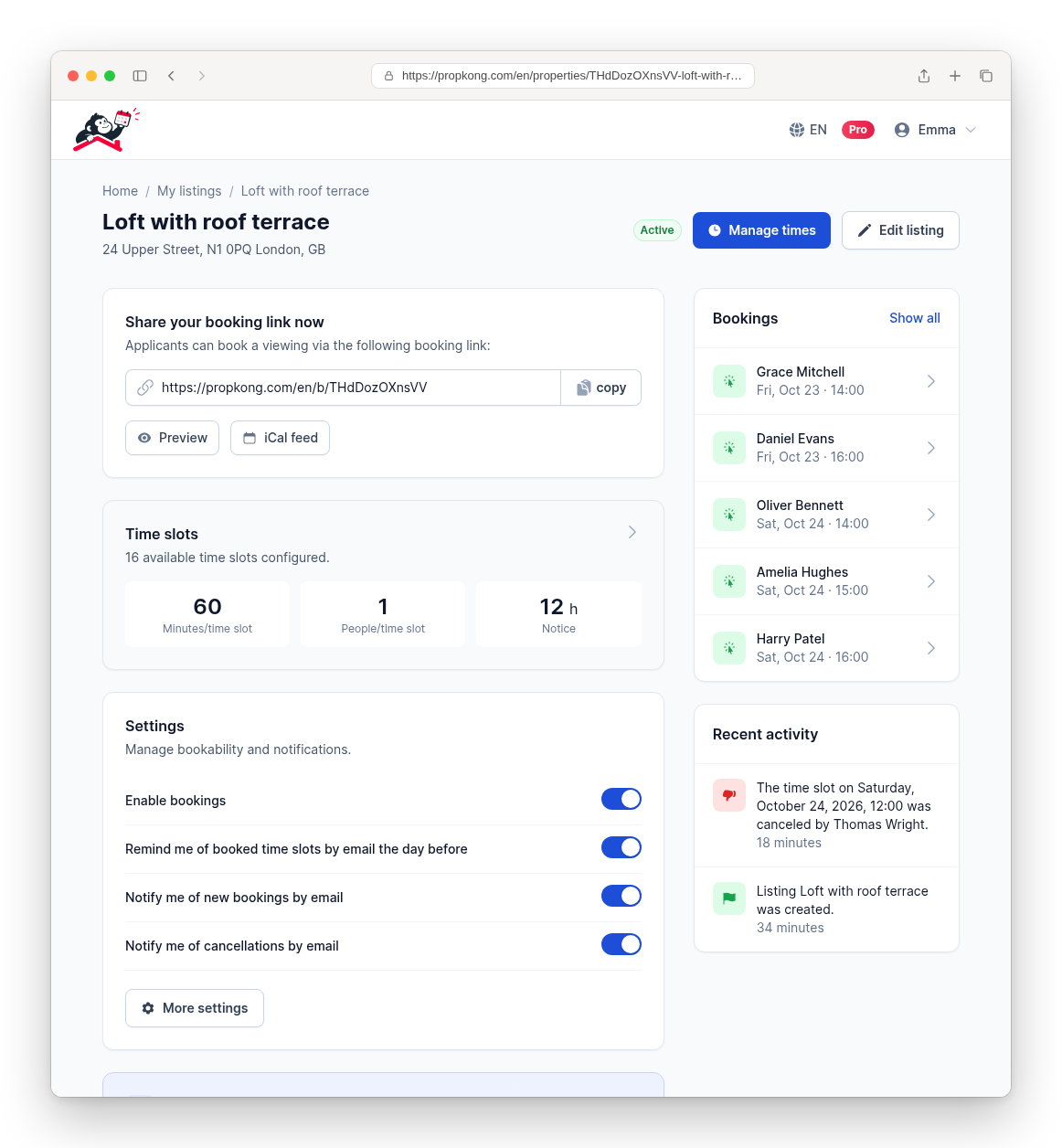
With PropKong, the setup takes about five minutes. A setup wizard walks you through the key decisions: how long a showing should last, whether you offer individual or group showings, how many people can book the same slot, and which days and times you are available. At the end you receive a booking link that you send to every applicant or paste into your listing.
⚠ BILD ERSETZEN: Smartphone-Screenshot des Einrichtungsassistenten von PropKong auf Englisch, Schritt „Dauer des Besichtigungstermins" (z. B. „How long should a viewing last?"). Alternativ vorhandener Screenshot app/assets/images/marketing/en/viewing-dashboard.png (Angebotsübersicht mit Buchungslink, 60 Minuten pro Zeitfenster) oder app/assets/images/marketing/en/book-a-viewing.png (Buchungsseite aus Sicht der Interessenten). (Vorlage: wohnungsbesichtigung-app.png)
Individual or group showings
Which format makes sense depends on demand. For an apartment with moderate interest, individual showings of 20 to 30 minutes give you time to talk to each applicant and answer questions properly. For a unit with far more inquiries than you can reasonably handle, group showings with five or six people per slot are more efficient: you show the apartment in fewer rounds, and applicants see for themselves that demand is real.
In both cases, the decision is a setting, not an organizational effort. You can also define how many hours in advance a slot can still be booked and until when applicants may cancel online. Automatic confirmations and a reminder the day before reduce no-shows, and cancellations free up the slot for someone else without any action on your part.
Virtual showings as a complement
Not every applicant can come in person. People relocating from another city, applicants with tight work schedules or those who want a first look before committing an afternoon all benefit from a virtual option. There are two common approaches.
A recorded tour is the low-effort variant: you walk through the apartment once with your phone and share the video, or you create a 360-degree tour that lets viewers move through the rooms at their own pace. This works well as a pre-filter, because applicants who book an in-person showing afterwards already know the layout and are more likely to be serious.
A live video showing is closer to the real experience. You walk through the apartment on a video call and answer questions as they come up. For one or two participants, a regular video call on WhatsApp or FaceTime is enough; for larger groups, a conferencing tool like Zoom or Google Meet is more practical. You can schedule live video showings the same way as in-person ones: create time slots, let applicants book, and send the call link to the people who booked.

Apartment showings booked with one link
Our viewing app lets you manage time slots, confirmations, cancellations and reminders in one place.
How effective is a virtual showing?
A virtual showing does not fully replace an in-person visit. Noise levels, smells, natural light at different times of day and the condition of surfaces are hard to judge on a screen. Most applicants will still want to see the apartment before signing a lease.
Its value lies in selection. A virtual showing lets applicants rule out an apartment early if the layout or condition does not match their expectations. That self-selection reduces the number of in-person showings that end with a polite "not for us," and it gives remote applicants a fair chance to compete with local ones.
Privacy during digital showings
Digital showings raise a few privacy questions that are easy to overlook. If the apartment is still occupied, ask the current tenant before filming and make sure personal items, mail and family photos are out of view. In a live call, avoid showing documents or screens with personal data.
The same care applies to applicant information. Names, phone numbers and email addresses collected for scheduling should only be used for the showing and the rental process, and stored where only you have access. A dedicated tool helps here because applicant data stays in one place instead of being scattered across inboxes and chat histories.
Conclusion
An apartment showing app does not change what a good showing looks like. It changes how much administrative friction sits in front of it. Instead of coordinating every appointment by hand, you define your availability once and let applicants book themselves, in person or by video.
PropKong is built for exactly this use case, whether you rent out an apartment or a house. Your first listing is free; after that, each additional listing costs €4.90, or €19.90 per month with Pro.