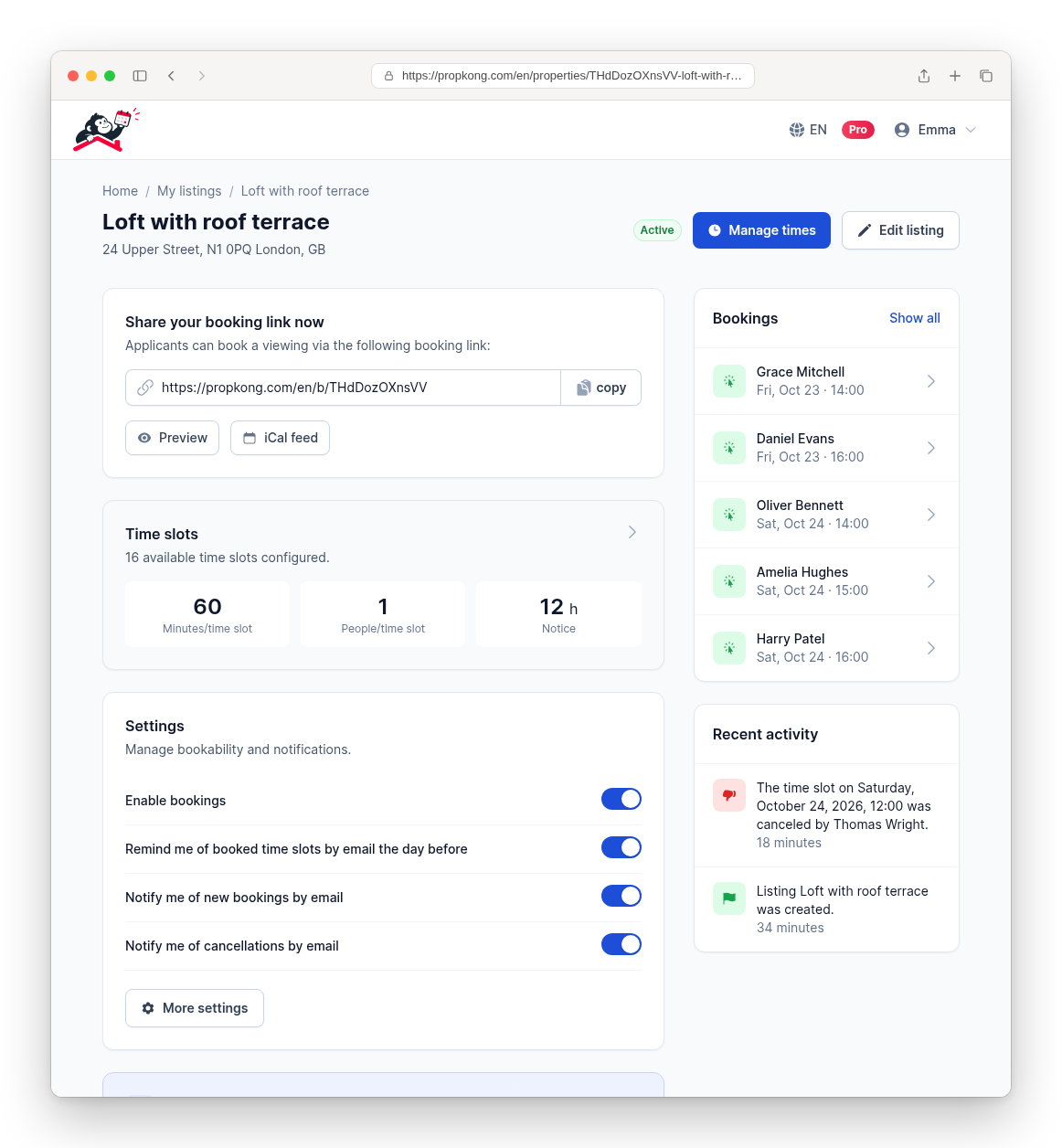
Scheduling looks harmless until it becomes a daily bottleneck. Emails, phone calls, follow-up questions about times, last-minute changes and forgotten appointments add up to constant background noise. A free appointment booking app addresses exactly this: it standardizes how appointments are made and reduces manual coordination to a minimum.
"Free," however, rarely means the same thing twice. Most booking tools offer a free tier with limits on bookings, calendars, team members or features. This article looks at what a booking app should do, how setup works in practice, and how to read the word "free" before you commit your workflow to a tool.
Why a free appointment booking app pays off
Time is the scarcest resource in many jobs. At the same time, clients and applicants expect fast responses and flexible booking options. Arranging appointments by phone or email is asynchronous, error-prone and does not scale: every proposed time is blocked until someone answers, and every answer can conflict with another offer you made in parallel.
A booking app moves this process into a clear system. Your availability is visible to everyone, people book on their own, and confirmations and reminders go out automatically. That reduces not only time spent, but also the friction of switching between inbox, phone and calendar dozens of times a day. For small businesses, freelancers and private landlords alike, the result looks more professional without adding administrative work.
What a good booking app should do
Not every booking app is practical. The deciding question is whether it simplifies real workflows or just opens another channel you have to monitor. In practice, these functions have proven most relevant:
- Flexible appointment logic: individual or group appointments, freely defined duration and custom time windows.
- Self-service online booking: people book outside your working hours, without waiting for a reply.
- Automated communication: booking confirmations and reminders by email, without manual follow-up.
- Calendar sync: an iCal feed that shows your bookings in Outlook, Apple Calendar or Google Calendar.
- No double bookings: availability updates in real time as slots fill up.
The goal is not maximum complexity but maximum clarity: a lean process that feels intuitive both for you and for the people booking.
How "free" usually works
Before choosing a tool, it is worth checking what the free version actually includes. Common models are a free plan with a monthly booking cap, a free plan limited to one calendar or one user, a time-limited trial, or a free plan that reserves reminders and integrations for paid tiers. None of these is unfair in itself, but a limit you discover after sharing your booking link is a problem.
With PropKong, the model is simple and stated up front: your first listing is free, including the booking link, confirmations, reminders and the calendar feed. After that, each additional listing costs €4.90 as a one-time payment, or you switch to Pro for €19.90 per month if you regularly run several listings at once. The free listing is not a trial that runs out after a few days, and you do not need a credit card to start.
PropKong is designed for situations where many people need to book a limited number of slots: property viewings for an apartment or a house, roommate interviews for a flatshare, guided tours or castings. If you need a booking tool for recurring client sessions with payment processing, a general-purpose scheduling tool may be the better fit.

Online booking for viewings and tours
Our viewing app lets you manage time slots, confirmations, cancellations and reminders in one place.
How setup works in practice
A booking app should be usable without technical knowledge. The setup typically follows a clear sequence:
- Decide whether you offer individual or group appointments.
- Set the appointment duration and select available time windows in the calendar.
- Add basic details such as the address or contact information.
- Receive a personal booking link that you can share or link from your website.
Through this link, people open the booking page and pick a free slot on their own. Confirmations and reminders are sent automatically, and you can change times or add new slots at any point. The decisive point: the organizational effort happens once, during setup. After that, the process runs largely on its own.
Concrete benefits in day-to-day work
Introducing digital booking has a direct effect on efficiency and service quality:
- Time saved: no phone tag, no individual time proposals.
- Fewer context switches: bookings arrive in one place instead of across email, phone and messaging apps.
- Fewer no-shows: automated reminders increase commitment.
- Clear overview: all appointments in one structured list, exportable as PDF or Excel.
The ability to accept bookings around the clock is particularly relevant. People book when it suits them, not when you happen to be reachable. That improves the experience for them and often shortens the time until an appointment is filled.
Booking apps also help you plan your own time. Instead of reacting to requests as they come in, you define your availability actively: you bundle appointments on specific days, leave buffer time between slots, and decide how many hours in advance a slot can still be booked. A clear rhythm replaces constant interruptions.
Conclusion
A free appointment booking app is not a nice-to-have but a tool for structural relief. It reduces manual coordination, prevents double bookings and makes your schedule transparent. What matters is that "free" is clearly defined: check which limits apply before you build your workflow around a tool. If you organize viewings, tours or interviews, PropKong lets you start with your first listing at no cost, with booking link, confirmations and reminders included, so you can judge the tool by real use.